NoFocusSteal

Stop apps from stealing focus on Windows.

You're mid-sentence and a popup jumps in front, so your keystrokes land in the wrong window. NoFocusSteal puts focus straight back where you were typing, flashes the pushy app's taskbar button instead, and tells you exactly which app it was.

Free and open source (MIT) · Windows 10 & 11 · one ~100 KB .exe · no installer

What it does

A small tray app that stays out of your way until something tries to jump in front of you.

Blocks focus stealing

If another app grabs focus while you're typing, focus returns to your window within a few dozen milliseconds. Your keystrokes stay where they belong.

Names the culprit

Every focus change is logged with the app, window, process ID and exe path, including invisible windows. Leave it running and check Top suspect.

Leaves you alone

Clicks, Alt+Tab, Win-key shortcuts, dialogs, the Start menu and closing windows all behave normally. It only steps in when nothing you did asked for the switch.

Nothing injected

No DLL injection and no API hooking of other programs. It uses the same public Win32 calls any app can use, all from its own process.

Per-app rules

Right-click an app in the log to always allow it, or to block it even when you aren't typing.

Private

It keeps the time of each keypress, never the key. It has no network code. The log is a local CSV file.

The focus log

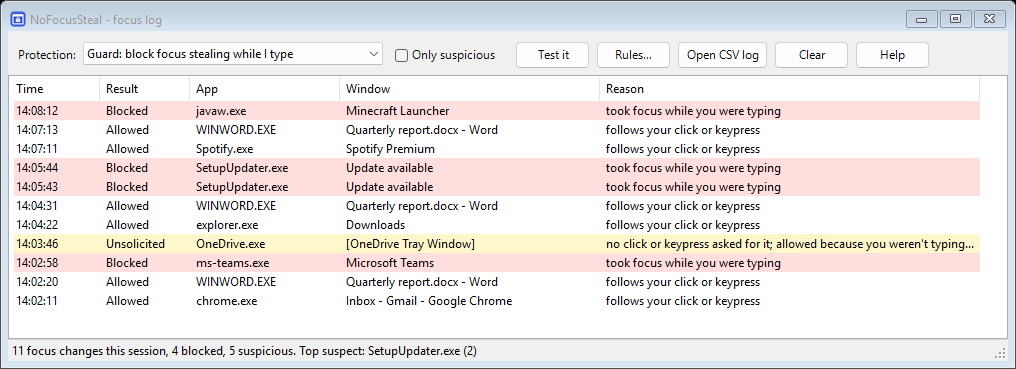
Red rows were blocked. Yellow rows were focus changes nobody asked for; that's where mystery "my window keeps losing focus" culprits turn up.

NoFocusSteal log window listing focus changes: Teams, an updater and a game launcher blocked while typing; OneDrive's invisible window flagged as unsolicited.

How it decides

NoFocusSteal watches foreground changes and the timing of your keyboard and mouse input, then asks one question: did you ask for this?

SituationResult
You clicked, used Alt+Tab, Win, Enter, Esc or a shortcut, and haven't typed sinceAllowed
The window you were in was closed, minimized or hiddenAllowed
Same app: a dialog, a new tab or a new windowAllowed
Start menu, search, Alt+Tab switcher, lock screen, UACAllowed
X-Mouse is on and you just pointed at the windowAllowed
Another app grabs focus within 1.5 s of your last keypressBlocked: focus comes back, the app's button flashes
Another app grabs focus right after you clicked inside your window, and it has grabbed focus beforeBlocked
An app grabs focus while you're idle, for the first timeLogged as unsolicited (blocked in Strict mode)
The same app does it again within 10 minutesBlocked, even while you're idle

Fake keypresses generated by software (the classic trick focus stealers use to get past Windows' own protection) are ignored, so apps can't sneak through.

Four modes

Guard (default)Block focus stealing while you type.
StrictBlock anything you didn't ask for. Apps you just launched may still come forward.
Log onlyChange nothing; just find out who's doing it.
OffPaused.

Get started

  1. Download NoFocusSteal.exe and run it. Nothing else to install.
  2. It lives in the tray. Left-click the icon for the log; right-click for modes and Start with Windows.
  3. Click Test it in the log window, start typing somewhere, and watch a test window fail to steal your focus.

The exe isn't code-signed yet, so SmartScreen may warn you. Click More info → Run anyway, or build it yourself. Releases are built by GitHub Actions from the public source and come with a SHA-256 checksum.

FAQ

How do I find out which program is stealing focus?

Run NoFocusSteal (Log only mode is enough) and carry on working. When it happens, look for yellow or red rows. Top suspect in the status bar names the worst offender, and right-click → Open file location shows the exact exe. Common culprits include updaters, chat apps, OEM helper utilities and background tasks that briefly open invisible windows.

Does it work in fullscreen games?

Yes. While you're pressing keys, popups can't pull you out. For games you play mostly with the mouse, switch to Strict mode.

My game loses focus every time I click (Windows 11 24H2, explorer.exe / MSCTFIME UI).

That's a Windows bug: an invisible input-method window owned by explorer.exe takes focus for a moment after each click. NoFocusSteal can't prevent it, because Windows usually hands focus back before NoFocusSteal can act. It does identify the bug in its log, so you know it's Windows and not another app. See the Microsoft Q&A thread for the workarounds people have tried.

Isn't X-Mouse (focus follows mouse) the fix?

X-Mouse makes the window under your pointer active, but a popup can still grab focus, and your typing lands in it until you move the mouse. It's also a common cause of "random" focus loss when it's switched on by accident (Settings → Accessibility → Mouse → "Activate a window by hovering over it"). NoFocusSteal works alongside it: windows you point at can take focus, and everything else is blocked.

I use apps that run as administrator.

Windows hides input sent to administrator apps (WizTree, Task Manager, installers) from normal apps, and doesn't let a normal app take focus back from one. So while an administrator app has focus, NoFocusSteal lets switches away from it through instead of guessing. Run NoFocusSteal as administrator to cover those apps too; the log tells you when this happens.

Doesn't the ForegroundLockTimeout registry tweak fix this?

Windows stopped honouring it reliably years ago, and apps that steal focus deliberately bypass it. That's why this question has come up for over a decade.

I use Remote Desktop, Mouse Without Borders or an on-screen keyboard.

Their input is generated by software, so NoFocusSteal ignores it by default. Add trustInjectedInput=true to %APPDATA%\NoFocusSteal\settings.ini.

Is it safe? It watches my keyboard.

It records when a key was pressed and whether it was typing or a shortcut, in memory only, never which key. There are no hooks, no injection and no network access. The source is short and public.

Why this exists

People have been asking for this since the Windows Vista days, and the answer kept being no:

"This is not possible without extensive manipulation of Windows internals and you need to get over it." — accepted answer on Super User, 2009